C4 Diagrams
Why Document Systems?
Documentation is only useful if you actually use it. ERDs are great for capturing a schema; UML makes a class easy to understand; Deployment Diagrams show how systems exist on hardware describes a slice of the whole. What about the structure of the Systems themselves and their dependencies? Surely there is an easy way to describe a System, show how the pieces fit together, and allow for easy recognition of patterns and concepts. That is what C4 is for: consistent, hierarchical views at different zoom levels for different audiences.
What is C4?
C4 is a shorthand notation for Context, Container, Component, Code. Each successive C is a slightly more zoomed picture of your software. It describes the interdependencies and structure of the system as a whole. C4 is really a series of Diagrams, how those diagrams are generated doesn't matter as long as they are accurate. I personally like using the Structurizr tool and its DSL (Domain Specific Language) that can be converted into the Diagrams. It's pretty easy to reason about and very easy for an LLM to digest. My examples will be written in the Structurizr DSL, however if you prefer Excalidraw or PlantUML feel free to use those instead.
I was first introduced to C4 by an architect. We were discussing a project where I was building an application that would depend on common APIs. He pulled up the System Context and showed me the external Authentication, went one step deeper and showed me the API to hit from Container view, and then showed me the controller endpoint I would be hitting from the Component view.
System Context
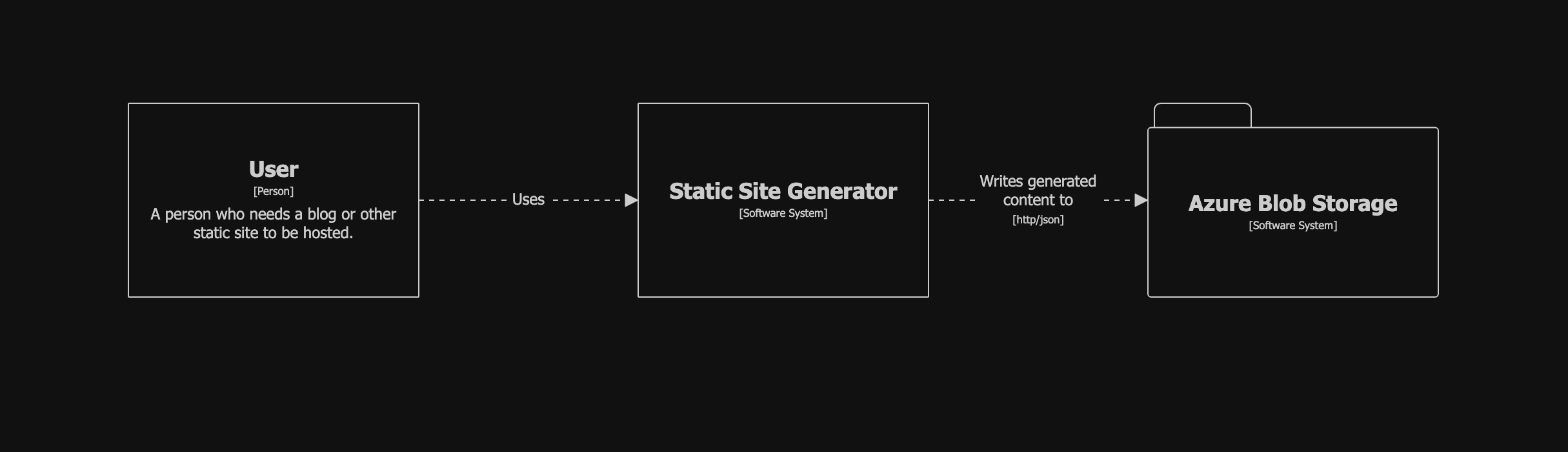
The System Context shows the system, its users, and its external dependencies. Usually, you would show something like this to a non-technical person. It's useful for describing where your System sits in the grand scheme of things. I am going to describe a simple system here, one that might exist if I ever finish working on my generic Static Site Generator.
workspace "SSG" "A Static Site Generator" {

    model {
        u = person "User" "A person who needs a blog or other static site to be hosted."
        ss = softwareSystem "Static Site Generator"

        azb = softwareSystem "Azure Blob Storage" {
            tags "folder"
        }

        u -> ss "Uses"

        ss -> azb "Writes files to"
    }

    views {
        systemContext ss {
            include *
        }

        styles {
            element "folder" {
                shape Folder
            }
        }
    }
}
Container
The container level shows what the System is made of. This zoom level is more for developers and shows deployable or runnable artifacts. Do not confuse Docker Containers for Containers, these are separate concepts. If your application has an API and a frontend, this is the level that will show it. The database will also show here. There is more that you can, and should, define here. Things like what each interaction is doing and what technologies are being used for it.
This all sounds very complex, so let's continue with our earlier example.
workspace "SSG" "A Static Site Generator" {
    !identifiers hierarchical

    model {
        u = person "User" "A person who needs a blog or other static site to be hosted."
        ss = softwareSystem "Static Site Generator" {
            cli = container "SSG CLI" "The CLI application for the SSG" "C# .NET"
        }

        azb = softwareSystem "Azure Blob Storage" {
            tags "folder"
        }

        u -> ss.cli "Uses"

        ss.cli -> azb "Writes files to"

    }

    views {
        systemContext ss {
            include *
        }

        container ss {
            include *
        }

        styles {
            element "folder" {
                shape Folder
            }
        }
    }
}
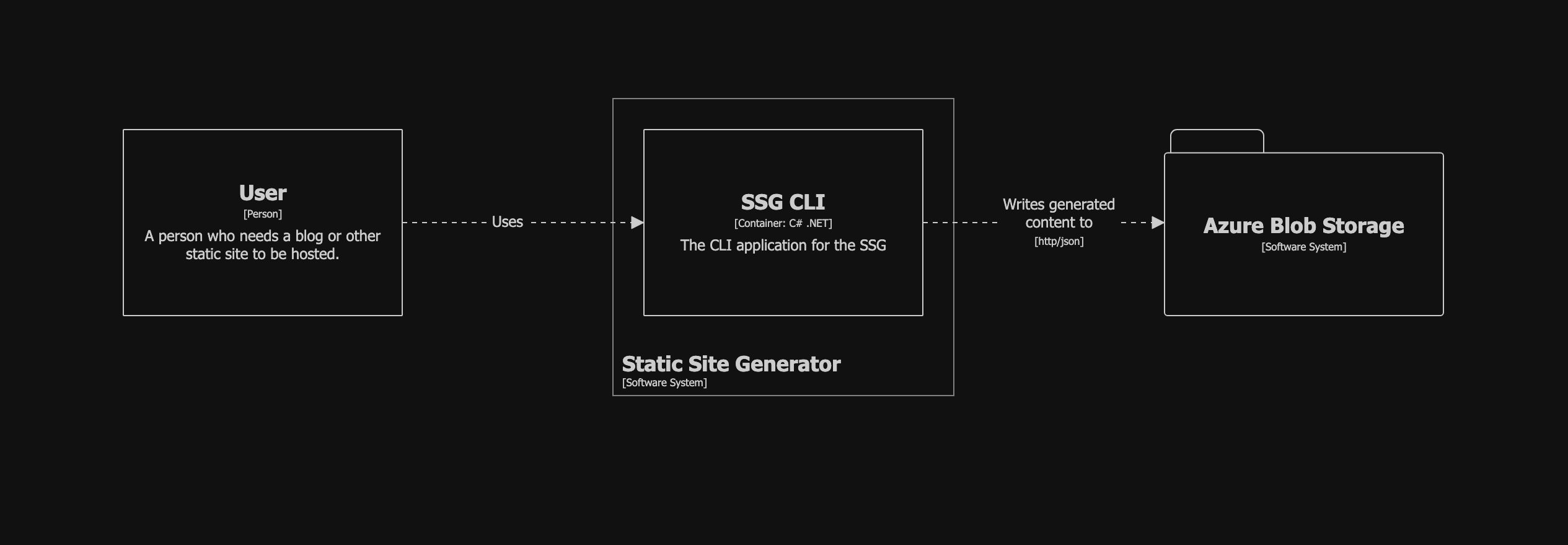
As you can see, we didn't change a whole lot here. We added two containers inside the Static Site Generator and changed some relationships. The System Context view is unchanged. However, there is now a new view that will show the CLI and the File System as being part of the Software System. I added the !identifiers hierarchical line inside the workspace, this allows me to do ss.cli where without that line it would be cli. This is useful particularly in the case where you might have multiple APIs inside different systems.
Component
The Component view is one more zoom level down and the lowest that engineers find useful. At this zoom level you will see controllers, services, repositories, command handlers, event handlers, and so on. Essentially, well-defined interfaces and their helpers; a controller and its backing services for instance. Not to be confused with the programming concept of an interface. Here is where I might break my DSL into separate files per container but only if the DSL starts to get huge.
workspace "SSG" "A Static Site Generator" {
    !identifiers hierarchical

    model {
        u = person "User" "A person who needs a blog or other static site to be hosted."
        ss = softwareSystem "Static Site Generator" {
            cli = container "SSG CLI" "The CLI application for the SSG" "C# .NET" {
                comParser = component "Command Parser" "Parses the Command Line arguments"

                websiteBuilder = component "Website Builder" "Takes configured rules and generates a website"

                pageBuilder = component "Page Builder" "Takes configured rules and generates a webpage"

            }
        }

        azb = softwareSystem "Azure Blob Storage" {
            tags "folder"
        }

        u -> ss.cli "Uses"

        ss.cli.comParser -> ss.cli.websiteBuilder "Calls"
        ss.cli.websiteBuilder -> ss.cli.pageBuilder "Calls"

        ss.cli.websiteBuilder -> azb "Writes generated content to" "http/json"
    }

    views {
        systemContext ss {
            include *
        }

        container ss {
            include *
        }

        component ss.cli {
            include *
        }

        styles {
            element "folder" {
                shape Folder
            }
        }
    }
}
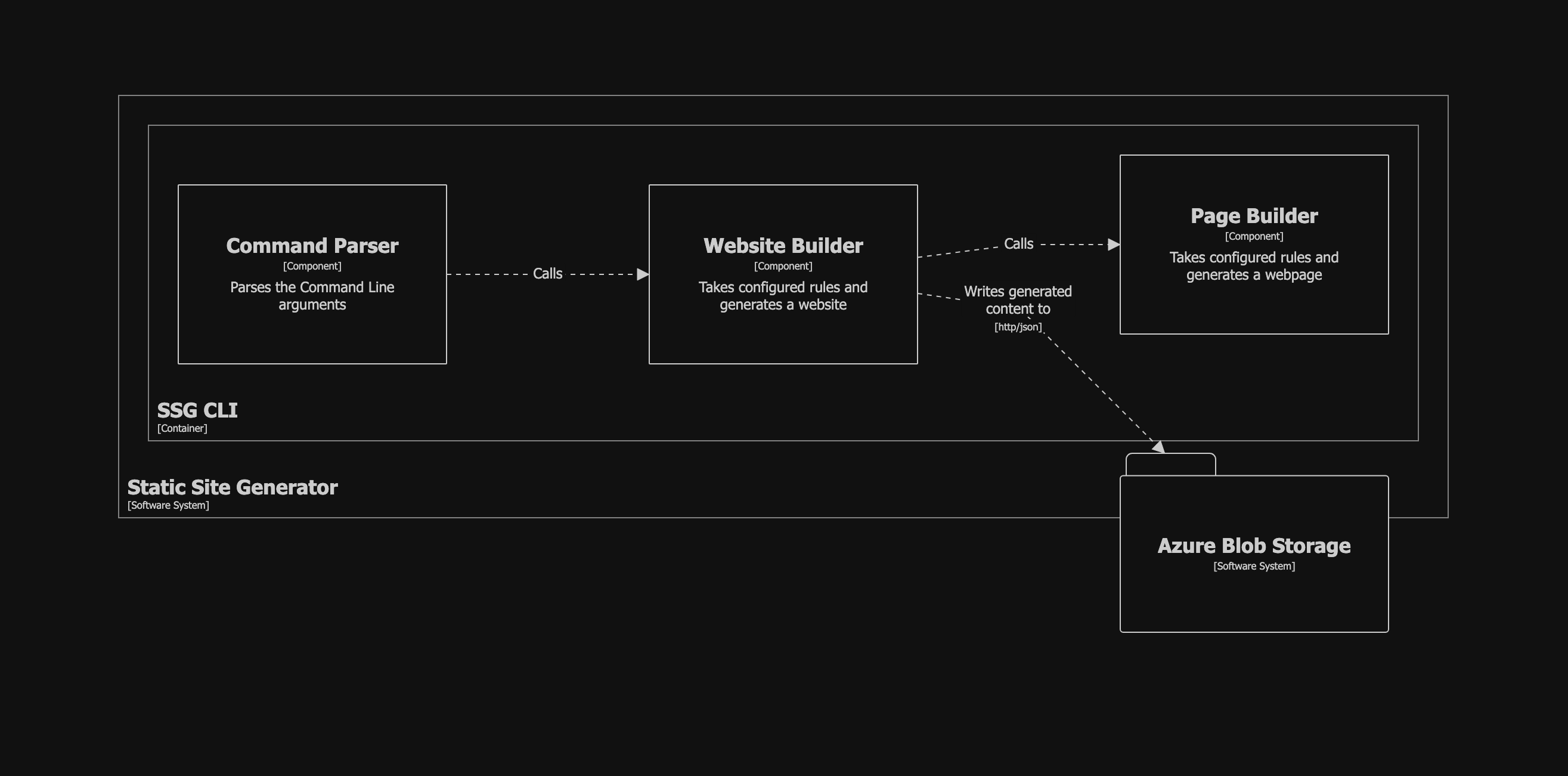
There we go, a very bare bones example of what a C4 can look like. I recommend going to https://playground.structurizr.com and looking at some of their examples or pasting my example into their inline editor.
Part 2?
With this, we have barely scratched the surface of this topic. Structurizr itself covers more scenarios such as deployment diagrams, ADR display, markdown documentation display and a whole host of options that cover so many architectural concerns. I will have to come back and write more on this subject.